

One-click unsubscribe
- In the inbox. Each marketing email carries the
List-UnsubscribeandList-Unsubscribe-Postheaders. Gmail, Apple Mail and other mail apps then show their own Unsubscribe button. One press there unsubscribes the person, with no page to visit. - In the email. Every marketing email has a visible unsubscribe link and your store’s address. If an email from your agent leaves either out, OpenEmails adds it at the bottom.
- The page. The link opens a page on your own hostname, with your store’s name and an Unsubscribe button. The page changes nothing when it opens. Only the button unsubscribes, so a mail filter that follows links can’t unsubscribe anyone.
- Test emails. A test email’s link shows Test unsubscribe instead. It changes nobody’s preferences.
- The consent change, dated at the click.
- An Unsubscribed entry on the do-not-email list.
- An unsubscribed event on the email they clicked from.
- A write-back that marks the matching Shopify customer unsubscribed, with that date.
The do-not-email list
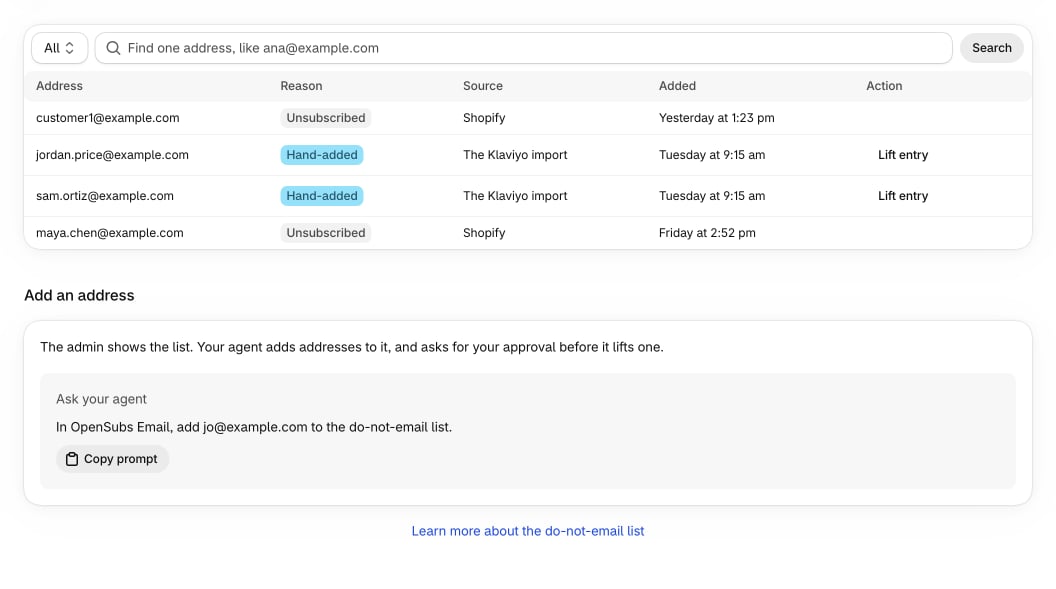
The do-not-email list holds every address that must not get marketing email. OpenEmails checks it, with the contact’s consent, each time it hands an email to your sender. That covers campaigns, flows and test emails. A contact can be subscribed and still be blocked by an entry, for example after a bounce. Each entry has a reason and a source. The source is where OpenEmails learned it, such as an unsubscribe link, PostShiba, a Klaviyo import or your agent.
An entry belongs to the address, not to a contact, so it outlives any contact.
Order and shipping emails are different. A transactional flow sends emails a customer must get, such as an order receipt or a shipping notice. These emails carry no unsubscribe header, and they still reach a contact who unsubscribed from marketing. A bounce, a complaint, a hand-added entry or an erasure still stops them. See Flows.
See the list
Open Contacts > Do-not-email list. The newest entries come first. Each row shows the address, reason, source, when it was added, and Blocked since. For an imported entry, Blocked since can be earlier than the date it was added.- Use View to filter by reason.
- Use Search by email address or domain to find entries. Part of an address or a domain is enough.
- Choose Export entries to make
do-not-email.csv, or ask your agent for an export. The private file expires 24 hours after it is made. Erased addresses are left out.
How addresses match
- Capitals don’t count.
Ana@Example.comandana@example.comare one address. - Plus tags don’t escape. An entry blocks the address with any plus tag. An entry for
ana+news@example.comalso blocksana@example.comandana+shop@example.com. A search for the full address of any of them finds the entries that block it. - Dots count.
ana.lee@example.comandanalee@example.comare different addresses. - International domains match. A domain in its own letters and the same domain in its ASCII form are one address.
- Erased people stay blocked. When a customer’s data is erased, OpenEmails removes their address from their entries and keeps a one-way code of it. The list shows these entries as Erased address. Only a search for the full address finds them.
Stop emailing someone
Your agent can unsubscribe contacts, or add addresses to the list by hand. It needs no approval, because the change only means less email.Lift a hand-added entry
You can lift only entries Added by hand, one at a time.- In the admin: on Contacts > Do-not-email list, find the entry, choose Lift entry and confirm. That is your approval. OpenEmails checks it with Shopify and records it with your staff account. The message that follows offers View approval.
- Through your agent: it calls
lift_do_not_email_entrywith the entry or its exact address. Then it sends you an approval link to open in the Shopify admin.
Tracking consent
OpenEmails records opens with a tracking pixel and clicks through tracked links, both on your own hostname. Turn either off on Settings > Email settings with Track opens and Track clicks. Each contact also has a tracking consent: agreed, unknown or declined. Only declined stops the recording. A contact who declined gets no pixel. Their clicks still reach the link, but OpenEmails doesn’t record them. The contact’s page shows the consent as a badge.- Tracking consent never changes whether someone gets email.
- Your agent records it with
set_tracking_consent. It gives the state and the date the person gave it, for chosen contacts or a whole list. A whole list runs in the background as a job. - Profiles that declined open or click tracking in Klaviyo arrive from a migration with tracking declined.
Contacts and lists
Where contacts come from, and how consent shows on each one.
Approvals
How a lift, and every other approval, works.